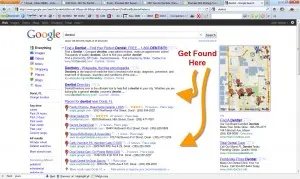
One of the most common questions that I get from Healthcare Practices is “How do I get my practice to show up on the Google Map?” Below is my Google Places Strategy that has helped get my clients to the first page of Google for their services in their local area:
Claim your Google Places Page. To claim your local listing on Google you need to visit www.google.com/places and set up your listing. Click here for step-by-step instructions for claiming your Google Places Page.
Build out your Google Places Page. Add your Website Address – This will create an important inbound link. Upload PHOTOS – AS MANY AS POSSIBLE – Use personal Photos – Pictures of yourself (the owner), Pictures of Your Staff, Pictures of the Office, Pictures of Your Trucks, Your Logo, Coupons, Pictures of your work. People Connect & Resonate With People. Leverage that in your Map Listing. Upload a Video if you have one (If you don’t – Get one made!). List your hours of operation & services offered. ADD a Coupon. Click here for ideas on how to Optimize your Google Places Account.
Update your website from an SEO perspective. By completing the necessary on page SEO updates you can significantly increase your placement in the map listings. Click here for my SEO Strategy for Dentists.
Get Reviews! A major component of placement in the Google Map listings is the number of reviews for your company. Put a procedure in place to consistently solicit reviews from your happy customers. We help our clients train their employees to keep their eyes and ears open for Happy Customers and then provide those happy customer with a “Share The Love Card”. This is a simple business card with a link to there Google Places page where they can quickly log-in and write a positive review for the business.
I can help get you TOP placement on Google for a majority of the Keywords in your area but I only work with ONE specialist in each City SO call me at 855-315-0611 before your competitor does.
Search Engines & Search Engine Marketing / Optimization can be very confusing. There are ALOT of moving parts and most healthcare organizations don't understand how they work.
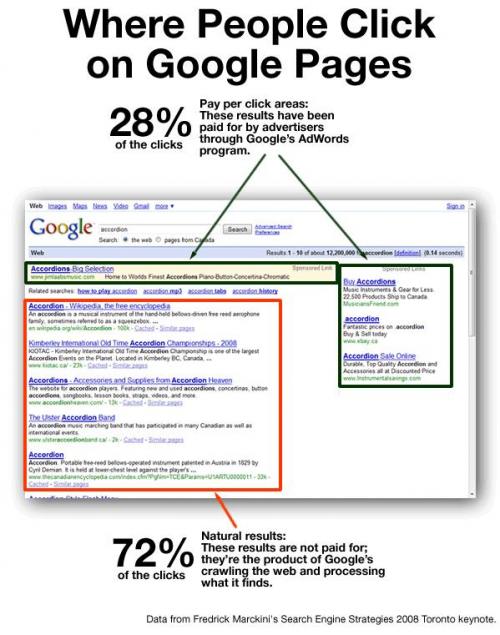
Below is an overview that will help you understand how the Search Engines Work and what the differences are between the Paid Listings (PPC), Organic Listings & Map Listings. By understand how each works and what the differences are you can put an effective strategy in place for each.
There are a number of things that you can do to position your practice to show up in these searches including:
Search Engine Optimization (SEO) – This is the process of optimizing your site so that it appears in the organic section of the search engine:
Search Engine Marketing (SEM) or Pay-Per-Click – This is the process of paying for placement for the keywords that you select:
There are benefits & limitations to both approaches. Ideally you need to have a strategy for both SEO & SEM.
If you look at the research, it becomes clear that consumers are more prone to click on the Organic, Non Pay-Per-Click listings so if you had to choose one vs. the other then you are going to get the Best Bang For Your Back by focusing on the Organic Listings.
If you are looking to obtain page ONE placement on Google, Yahoo & Bing for the Keywords in your City – we can help but we only work with ONE specialist in each City SO call us at 855-315-0611 before your competitor does or if you want to learn to do it on your own Click here to download our Free Guide.
In today’s environment is has become increasingly important for Healthcare Providers to be visible on the Major Search Engines (Google, Yahoo & Bing) as consumers are searching for their services. The fact is, Search Engines are now the #1 source for consumers when the look for local services.
Below is our SEO Strategy for Healthcare Practices:
Below is our SEO Strategy for Healthcare:
Step 1 - Build out the website & obtain more place holders on the major search engines.
A Typical Dental Site is has only 5-6 pages (Home – About Us – Our Services – Coupons – Contact Us). That does not create a lot of indexation or place holders on the major search engines. Most dental practices provide a wide variety of services including Teeth Whitening, Dental Implants, Invisalign, Periodontal Treatment, Crowns & Bridges, and Teeth Cleaning just to name a few. By BUILDING out the website and creating separate pages for each of these services (combined with city modifiers) the dental practice can get listed on the search engines for each of those different keyword combinations. Here is an example:
Home – About – Coupons – Contact Us
Sub Pages for Each Service – Plantation Teeth Whitening, Plantation Dental Implants, Plantation Invisalign Specialist, Plantation Teeth Cleaning, etc
They often provide services in a large number of cities outside their primary City. In order to be found on the major search engines for EACH of those sub cities additional pages need to be created:
Sub Pages for Each Sub-City Serviced – Kendall Dentist, Doral Dentist, Homestead Dentist, etc.
Step 2 - Optimize Pages for Search Engines:
Once the pages are built for each of your core services & sub-pages each of the pages need to be Optimized from an SEO perspective so that the search engines understand what the page is about & list you for those words. Here are some of the most important items that need to be taken care of for on-page search engine optimization:
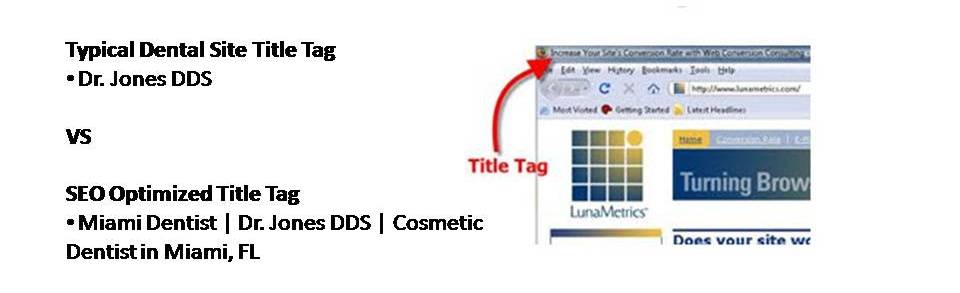
Unique Title Tag on Each Page
H1 Tag re-stating that Title Tag on each Page
Images Named with primary Keywords
URL should contain page keyword
Anchor Text on each Page & built into Footer - Miami Dentist
XML Sitemap should be Created & Submitted to Google Webmaster Tools and Bing Webmaster Tools
Step 3 - Inbound Links
Once the pages are built out and the "on-page" SEO is complete the next step is getting inbound links. Everything we have done to this point is sort of like laying the ground work - you have to have the pages in order to even be in the running...but it is the number of QUALITY inbound links to those pages that is going to determine placement.
30% of SEO is On-Page type work The Other 70% is Link Building
So once the pages are built out we are really just getting started. The only way to get your site to rank above your competition is by having MORE quality inbound links to your site.
He Who Has The MOST Quality Inbound Links WINS!
There are a number of things that you can do to increase the number of inbound links to your site.
Association Links - Be sure that you have a link to your site from any industry associations that you belong to (Dental association, Chamber of Commerce, Networking Groups, etc).
Directory Listings - Get your site listed on as many directory type listings as possible (Angies List, Yahoo Local Directory, Judy's Book, Yelp.com, Etc)
Create Interesting Content / Articles about your industry. This is probably the #1 source of inbound links because you can write an article about "Hot water heaters" and push it out to thousands to article directory sites each containing a link back to a specific page on your site.
If you build out your site for your services & sub-services, optimize the pages using SEO best practices and then systematically obtain inbound links to those pages & sub-pages you will start to DOMINATE the search engines for the dental related keywords in your area.
If you are looking to obtain page ONE placement on Google, Yahoo & Bing for the Keywords in your City – we can help but we only work with ONE specialist in each City SO call me at 855-315-0611 before your competitor does.
Establish a Consistent NAP– You need to establish a consistent NAP (Name Address & Phone Number) across the web on your website as well as on the major Data Providers (InfoUSA, Super Pages, Yelp, City Search, etc).
Consistent Name – Pick the format for your name & stick with it. E.G. "West Dental Group" not "West Dental".
Consistent Address – If your address is 1267 SW 29 St, Suite 10 you want to be sure that it reads that exact way on and not 1267 SW 29 St #10.
Consistent Phone Number – You want to you the same number on each of these sites (if you don’t, it will hurt you).
Use a LOCAL not Toll Free Phone Number
Some of the Data Provider listings that you want to be sure that you are in include:
InfoUsa
Yelp
City Search
Super Pages
Insider Pages
Get Reviews– Reviews are a key determinant of placement within the Map Listings.
The number of reviews of your local listing is a key determinant in placement.
As a practice, you need to request reviews from your customers in order to get them. A strategy that we use takes a three pronged approach:
Send an initial email to your client database asking them to write a review of your company on Google and provide them with the URL to your Google Places page.
Keep an open ear for Happy Customers and ask them if they would be willing to write a review. If so, get their email at that moment and let them know that you will be sending them an email with the link to write the review.
Have a “Review Us” card printed and give it to your customers after service.
Build out your Places Page– You have the option to upload photos, videos & coupons.
Fill your Places page with Quality Content. Add all 10 photos with pictures of the office, pictures of the staff, your logo, pictures of your coupons / special offers, pictures of your trucks & equipment, etc.
Upload a video or two. These videos don’t necessarily need to be High Definition or Professionally Produced. Break out your digital video camera or even your iPhone and take a few choice shots. Record yourself (the owner or manager) explaining who the company is, what you do, and what your unique selling proposition is.
Select the Right Categories – You have the option to choose upto 5 categories. It is very important to select the appropriate categories and/or add new custom categories as needed.
Increase your Citations– All things being equal, Citations are a key determinant of placement. Just like in SEO where in-bound links determine placement with Local Listings citations determine placement. He who has the most quality citations wins.
Citations or listings across the web that contain your NAP (Name Address & Phone Number) with or without a link.
In order to build up your citations:
Add yourself to the local directory sites where you are not currently listed.
InfoUsa
Yelp
City Search
Super Pages
Insider Pages
Search for “your industry, Directory”
Search “Your City, Directory”
Look at the listings of the people who have Spot A, B & C on the Map for your services and look that their citations. In many cases you can go out and get those same citations!
If you are looking to obtain page ONE placement on Google, Yahoo & Bing for the Keywords in your City – we can help but we only work with ONE specialist in each City SO call us at 855-315-0611 before your competitor does or if you want to learn to do it on your own Click here to download our Free Implementation Guide.
2. Click on Create an account or Log-in using your Google Username & Password
3. Enter all of the necessary contact information
4. Then click on “List your business”
5. Enter your phone number so that Google can determine if you already exist in their database
6. If your company comes up, click “Edit” if it doesn’t, click “Add New Listing”
7. Fill in all of the necessary information
Update Your Company Name to Read “Company Name) – E.G. Advance Dental (Don't add anything extra here!)
Add your Website Address – This will create an important inbound link
Upload PHOTOS – AS MANY AS POSSIBLE – Use personal Photos – Pictures of yourself (the owner), Pictures of Your Staff, Pictures of the Office, Pictures of Your Trucks, Your Equipment, Your Logo, Coupons, Pictures of your work. People Connect & Resonate With People. Leverage that in your Map Listing
Upload a Video if you have one (If you don’t – Get one made!)
List your hours of operation & services offered
Press Submit
8. You will be asked how you want to confirm your listing – via Phone or Postcard.
ALWAYS CHOOSE PHONE. It is much faster & will ensure that your complete the process
The Postcard Option takes 2-3 weeks
9. You will receive a call from Google’s automated system immediately. The automated system will provide you with a 5 digit code
Make sure you or someone is available to answer the Office Line listed in your map listing.
10. Enter that code on the next screen & press “GO” in order to activate your listing
You will see a confirmation page indicating that you have successfully activated your listing.
That’s it! You have completed the 10 steps to claiming & setting up your Google Map listing on Google Places.
Here is what your Google Places Account Admin Area will look like once you are complete:
Here you will be able to edit your listing, add a coupon & check our your Google Places Page Stats
How many people are pulling up your Google Places Page
What are they searching to get to you
How many of them are clicking to your site, etc
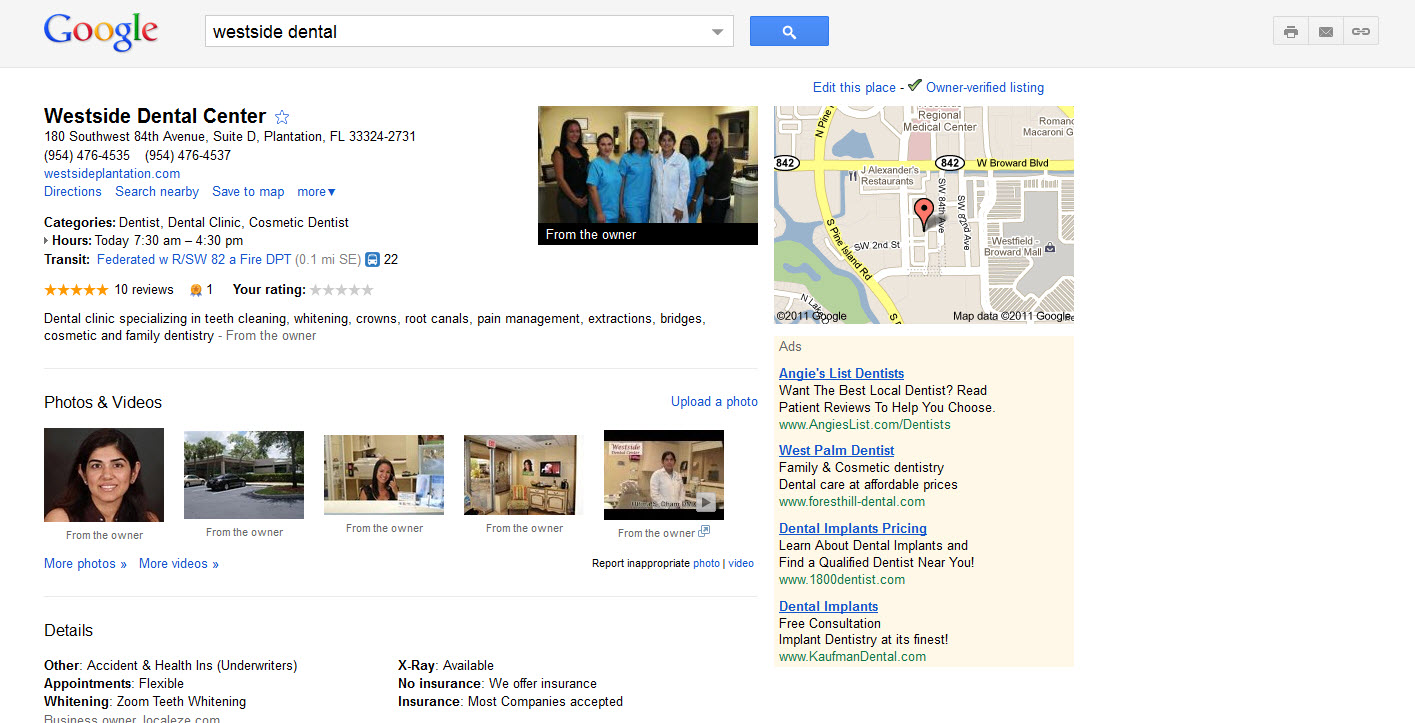
Here is what you Google Map Listing will look like on Google once you are Complete
Look for the “Practice Owner Verified” check box in the top right corner
GET REVIEWS – Getting reviews has been proven to increase placement in the map listing
If you are looking to obtain page ONE placement on Google, Yahoo & Bing for the Keywords in your City – we can help but we only work with ONE specialist in each City SO call us at 855-315-0611 before your competitor does or if you want to learn to do it on your own Click here to download our Free Implementation Guide.